Mastering application diagnostics requires moving beyond basicprint()statements. This Python logging tutorial explores how to effectively utilize Python’s built-inloggingmodule. This is to track application behavior, record errors, and manage output destinations efficiently.
Understanding Python Logging Levels
Python’s logging module supports five standard log levels ordered by increasing severity.
To capture all of them, your configuration level must be set appropriately. When you Python logging set level, you determine the threshold for what gets recorded; anything below that threshold is filtered out.
The five Python logging levels include:
-
logging.debug(): Fine-grained diagnostic events, useful mostly for step-by-step debugging during development. -
logging.info(): Confirmation that things are running smoothly, such as standard program start and stop steps. -
logging.warning(): An alert that something unexpected happened or a potential issue is on the horizon (e.g., low memory or deprecated features), though the program still functions. -
logging.error(): A more serious problem where a specific function or operation failed. Usingexc_info=Trueautomatically appends the traceback. -
logging.critical(): A severe error indicating the application itself may be unable to continue running.
Implementing a Python Logging Example
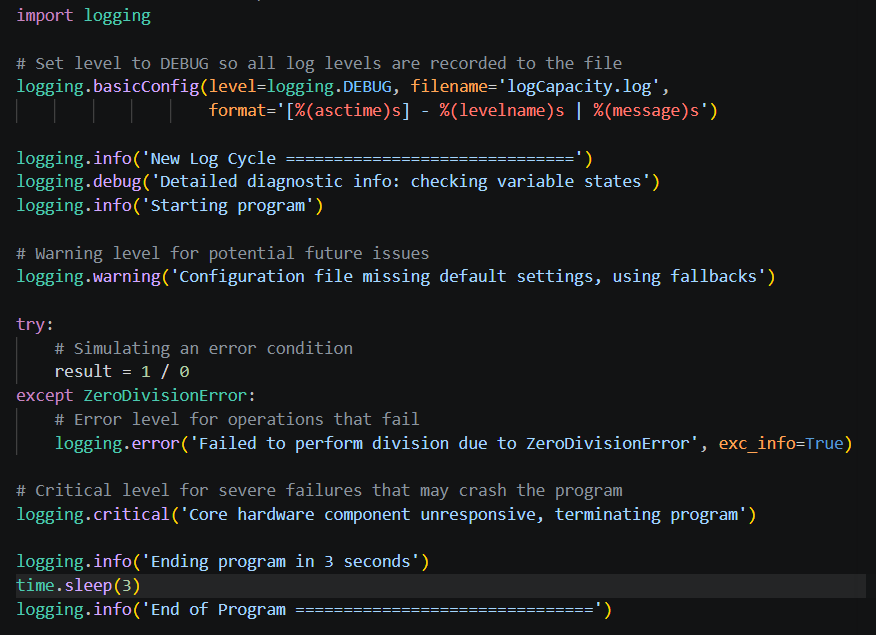
The following Python logging example demonstrates how to capture all five severity levels, configure timestamps, and direct output into a log file.
Directing Logs: Files vs. Console Output
By default, the script above handles Python logging to file by writing records directly into ProgLogDoc.log. Each entry captures the exact timestamp, severity level, and description:
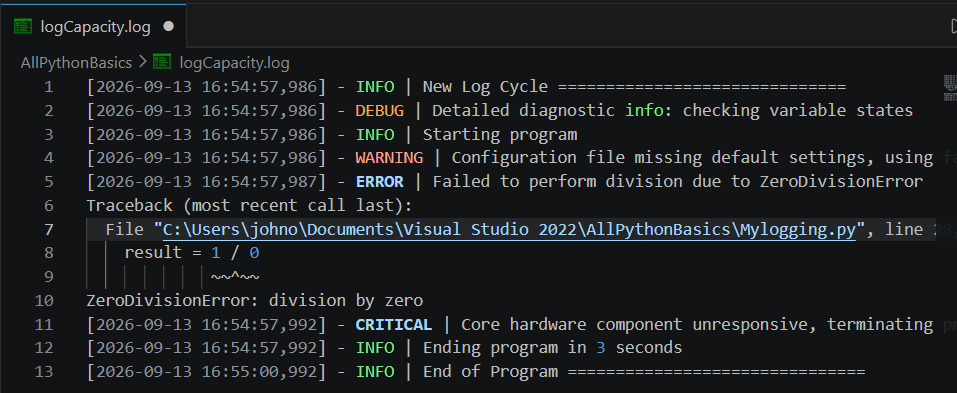
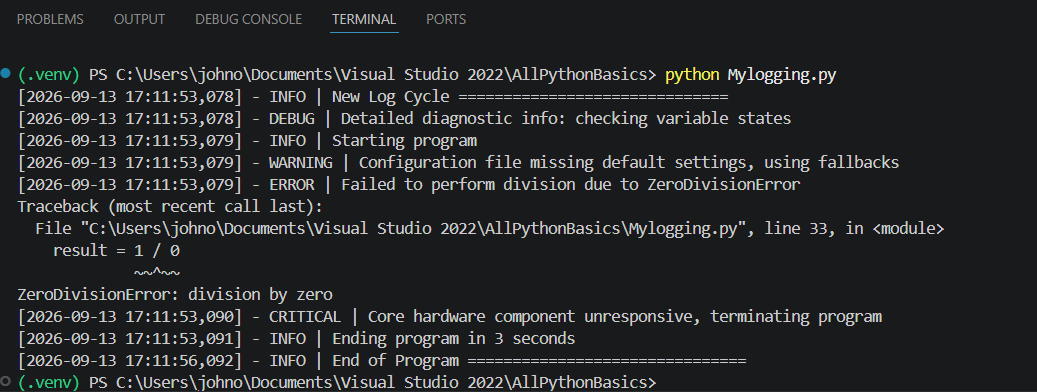
However, during local development, you may want Python logging to console or Python logging to stdout so you can view messages instantly in your terminal.
To output logs directly to the standard output stream instead of saving them to a file, simply omit the
filename parameter inside basicConfig: # Set level to DEBUG so all log levels are recorded to the output Console Streamlogging.basicConfig(level=logging.DEBUG, format='[%(asctime)s] – %(levelname)s | %(message)s’)
Python Logging Best Practices
-
Always set an explicit level: Avoid relying entirely on the default
WARNINGthreshold for production environments unless intended; explicitly configure your logger usinglogging.DEBUGorlogging.INFObased on your environment. -
Include timestamps: Use
format='%(asctime)s - %(levelname)s - %(message)s'to ensure every log entry is traceable by date and time. -
Leverage
exc_info=True: When catching exceptions, always passexc_info=Trueto your error logs to capture complete tracebacks rather than just the error message string. -
Avoid printing sensitive data: Ensure passwords, API tokens, or hardware configuration secrets are never exposed in log streams or saved log files.
Hence, always set an explicit level. Do not rely on defaults; Always include timestamps in your formatting string; Further, Pass exc_info=True when logging caught exceptions. And Never log sensitive passwords or secret tokens.